
Welcome, friend, to this comprehensive technical guide. If you are a web developer or have just started your journey into JavaScript, you’ve likely run into this puzzling question: “Where should I store user data?”
In the world of web development, we primarily rely on three technologies for client-side storage: Local Storage, Session Storage, and Cookies. While all three perform similar functions, each has a distinct “personality” and specific use cases.
In this article, we’ll break down these concepts in a simple, practical way to understand: What is the difference between Local Storage, Session Storage, and Cookies in JavaScript? and how to choose the right one for your next project.

What is Browser Storage?#
Before we dive into the details, let’s look at the big picture of Storage. Simply put, a browser isn’t just a tool for viewing websites; it’s a runtime environment capable of keeping small amounts of data on the user’s device. This often saves us from sending every tiny piece of information to the “server,” making the website faster and smoother.
Why do we need local storage?#
- Improving User Experience: Such as saving “Dark Mode” preferences.
- Performance: Reducing the number of server requests.
- Persistence: Keeping a user logged in even after they close the browser.
1. What is Local Storage?#
When asking “What is the localStorage property in JavaScript?”, we can define it as a permanent data store within the user’s browser. It is part of the “Web Storage API” and allows you to save data as Key/Value pairs.
Key Features of Local Storage:#
- Persistence: Data never expires; it stays even if the user closes the browser or restarts their computer.
- Capacity: It offers a generous storage limit (usually 5MB to 10MB depending on the browser).
- Simplicity: Interacting with it via JavaScript is incredibly straightforward.
Pro Tip: Data in Local Storage is only deleted manually via code or if the user clears their browser’s cache and site data.
2. What is Session Storage?#
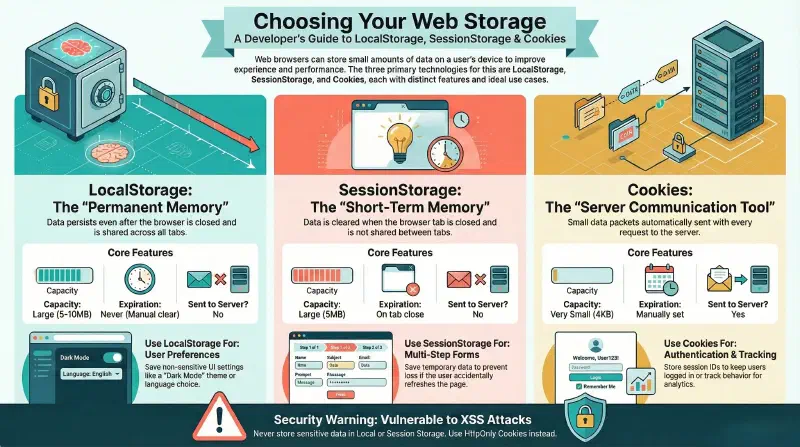
If Local Storage is the “permanent memory,” then Session Storage is the “short-term memory.” It works almost exactly the same way, but differs drastically in data “lifespan.”
What is the difference between SessionStorage and LocalStorage?#
The core difference lies in the Session. Data in Session Storage is wiped the moment the user closes the specific “tab” or browser window. Furthermore, it isn’t shared across different tabs—even if they are from the same website—as each tab has its own unique session.
3. What are Cookies?#
Cookies are the oldest and most famous of these technologies. They aren’t just a storage medium; they are a communication tool between the browser and the server. With every HTTP Request sent to the server, cookies are automatically bundled and sent along.
Is Local Storage considered a type of Cookie?#
The short answer is No. Cookies are primarily used for user identification and session tracking between the client and server. Local Storage, on the other hand, is a purely local data store that the server never sees unless you manually send the data.
Full Comparison: Local Storage vs. Session Storage vs. Cookies#
This table summarizes the fundamental differences you need to know as a developer to make the right choice:
| Comparison | Local Storage | Session Storage | Cookies |
|---|---|---|---|
| Capacity | Large (5MB - 10MB) | Large (5MB) | Very Small (4KB) |
| Expiration | Never expires | When tab is closed | Set manually (or session-based) |
| Server Connection | Not sent with requests | Not sent with requests | Sent with every HTTP request |
| Ease of Use | Very Easy (Web API) | Very Easy (Web API) | Somewhat complex (needs parsing) |
| Security | Lower (Vulnerable to XSS) | Lower (Vulnerable to XSS) | More secure (HttpOnly flag) |
When to Use Each Type? (Practical Examples)#
1. Local Storage Use Cases#
- Saving UI settings (e.g., language, theme).
- Saving “Shopping Cart” items for e-commerce sites that don’t require immediate login.
- Storing user-written drafts that haven’t been published yet.
2. Session Storage Use Cases#
- Saving data in long multi-step forms to ensure data isn’t lost if the user refreshes the page.
- Storing sensitive actions that should end as soon as the user leaves the page.
3. Cookies Use Cases#
- Authentication: Saving Session IDs or Login Tokens.
- Tracking: Tracking user behavior for advertising purposes.
- Personalization: Remembering a user when they return to the site.
Which is Better: Cookies or Sessions?#
This is a common question, and the answer depends on: “Where do you want to process the data?”
- Cookies: Best if the data needs to be read by the Server-side (e.g., verifying user identity).
- Web Storage (Local/Session): Best for Client-side UI data that the server doesn’t need to know about constantly. This saves bandwidth and provides more space.
Security: Is Browser Storage Safe?#
You must be very careful. Never store sensitive information like passwords or credit card numbers in Local Storage or Session Storage.
Technical Warning: Any JavaScript code running on your page can read the data in Local Storage. This means if your site is hit by an XSS (Cross-Site Scripting) attack, a hacker can steal everything stored there.
For sensitive data, always prefer HttpOnly Cookies, as they prevent JavaScript from accessing the data entirely.
How to Use These Technologies? (Code Examples)#
All these technologies work through JavaScript in the browser. While the basic logic is similar, the lifespan and scope of the data are what set them apart.
Dealing with Local Storage#
Used for permanent storage. Data remains after the browser is closed.
Example: Saving User Settings (Dark Mode)#
// Saving data
localStorage.setItem('theme', 'dark');

// Reading data
const currentTheme = localStorage.getItem('theme');
console.log(currentTheme); // dark

// Deleting one item
localStorage.removeItem('theme');

// Clearing all data
localStorage.clear();
Important Notes:#
- Data is stored as Strings only.
- Data is shared across all Tabs of the same site.
Storing an Object in Local Storage#
Since Local Storage only supports strings, you must convert objects to JSON:
const user = { name: 'John', role: 'Admin' };

// Saving the object
localStorage.setItem('user', JSON.stringify(user));

// Reading the object
const savedUser = JSON.parse(localStorage.getItem('user'));
console.log(savedUser.name); // John
Dealing with Session Storage#
Works almost exactly like Local Storage, but data is cleared when the tab is closed.
Example: Storing temporary session data#
// Saving session data
sessionStorage.setItem('temp_id', '12345');

// Reading data
const tempId = sessionStorage.getItem('temp_id');
Dealing with Cookies#
Used for small data packets sent to the server.
Creating a Cookie with JavaScript#
document.cookie = "language=en; path=/; max-age=86400"; // Expires in 24 hours
Reading all Cookies#
console.log(document.cookie);Note: Reading a specific cookie requires manually parsing the text or using helper functions.
Deleting all Cookies#
document.cookie = "language=ar; path=/; max-age=0";Quick Comparison from a Programming Usage Perspective#
| Technology | Usage Method | Storage Duration | Sent to Server |
|---|---|---|---|
| Local Storage | JavaScript | Persistent | ❌ |
| Session Storage | JavaScript | Temporary | ❌ |
| Cookies | JavaScript / Server | Depends on setup | ✅ |
FAQ#
Does clearing Cookies affect Local Storage?#
Usually, when a user selects “Clear browsing data,” they have options to clear cookies and other site data. If they clear “Site Data,” both Local Storage and Cookies will be deleted.
What is the difference between Cookie data and Session data?#
Cookie data is stored in the browser and sent to the server. “Session data” in the backend sense (like PHP or Node sessions) is stored on the Server, linked to the browser via a small cookie containing only a unique ID.
Is it better to clear Cache or Cookies?#
- Cache: Clear it if the site isn’t showing new image or file updates.
- Cookies: Clear them if you’re having login issues or want to stop a site from tracking you.
Summary#
Understanding the difference between Local Storage, Session Storage, and Cookies is a cornerstone of building professional and secure web applications. Always remember:
- Use Local Storage for permanent, non-sensitive data.
- Use Session Storage for temporary data that ends with the tab.
- Use Cookies for authentication and server-client communication.
I hope this guide has cleared up these vital programming concepts for you. If you have any questions about how to apply these in your project, feel free to ask!