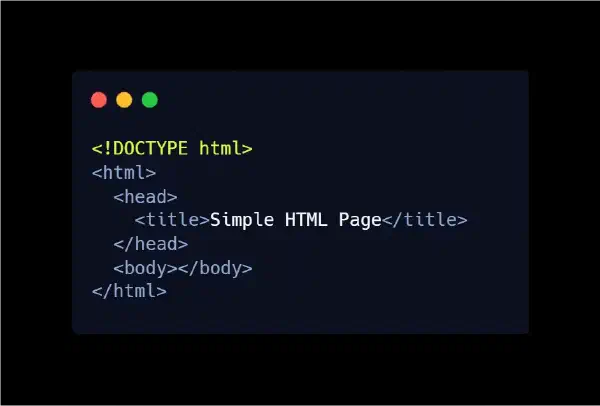

Now that you understand the core HTML elements every webpage needs, it’s time to look at something just as important — yet often ignored by beginners: Meta Tags, also known as Metadata.
A webpage shouldn’t just look good. It also needs to be understandable to search engines like Google and Bing. That’s exactly where meta tags come in: they serve as the digital identity card of your webpage, telling search engines what your content is, how it should be displayed, and how users should interact with it.
Meta tags are a foundational part of Technical SEO, one of the core pillars of search engine optimization. But before we dive deeper into metadata, let’s take a quick look at what SEO actually means — and why it’s crucial for any website.
What Is SEO — and Why Should You Care?#
SEO (Search Engine Optimization) is the practice of improving your website so it ranks higher in search results on platforms like Google and Bing.
Simply put, SEO helps search engines understand your content and match it with the right audience at the right time.
Why SEO matters:
- Higher organic traffic — you show up in search results without paying for ads.
- More trust and credibility — users trust top results more than ads.
- Supports business and content goals — from selling products to sharing knowledge.
- Adapts to modern search behaviors — including voice search, images, and even AI-powered discovery.
Bottom line: SEO helps your website get found by the people who are actively looking for what you offer.
The Four Main Types of SEO#
SEO is like a balanced sports team — every part plays a unique role. There are four main types:
1. Technical SEO#
Focuses on the structure and performance of your website, ensuring search engines can crawl and understand it.
Includes:
- Page speed optimization
- Mobile responsiveness
- Clean site architecture
- Correct use of meta tags
- XML sitemaps and proper URL structure
Think of Technical SEO as your defensive line — it keeps everything running smoothly behind the scenes.
2. On-Page SEO#
Deals with optimizing content inside your pages.
Examples:
- Targeting the right keywords
- Writing optimized titles & meta descriptions
- Proper header structure
- Internal linking
On-page SEO is your offense, helping you engage users and signal relevance to search engines.
3. Off-Page SEO#
Everything that happens outside your website but affects your reputation.
Includes:
- Backlinks
- Social media presence
- Brand authority
Off-page SEO is your fanbase — the external signals that build trust.
4. Local SEO#
Helps your website appear in location-based searches, like:
- “Coffee shop near me”
- “Dentist in Los Angeles”
Includes:
- Google Business Profile setup
- Accurate name, address, and phone (NAP) data
- Customer reviews
Local SEO is ideal for businesses that rely on nearby customers.
What Is Technical SEO — and How Do Meta Tags Fit In?#
Technical SEO ensures that search engines can easily access, crawl, and interpret your website.
This includes performance, mobile-friendliness, structured data, and — most importantly — metadata.
Meta tags influence:
- How search engines read your title and description
- How your content appears in SERPs
- How your page is presented on social media
- How browsers handle and render your page
Think of meta tags as the official ID card of your webpage — without them, search engines can’t fully understand your content.
What Are Meta Tags?#
Meta tags are snippets of information placed inside the <head> section of your HTML document.
They don’t appear on the page itself, but they tell browsers and search engines:
- What your content is about
- How it should be indexed
- How it should be displayed
- How it should behave on different devices
The Most Important Meta Tags in HTML (With Examples)#
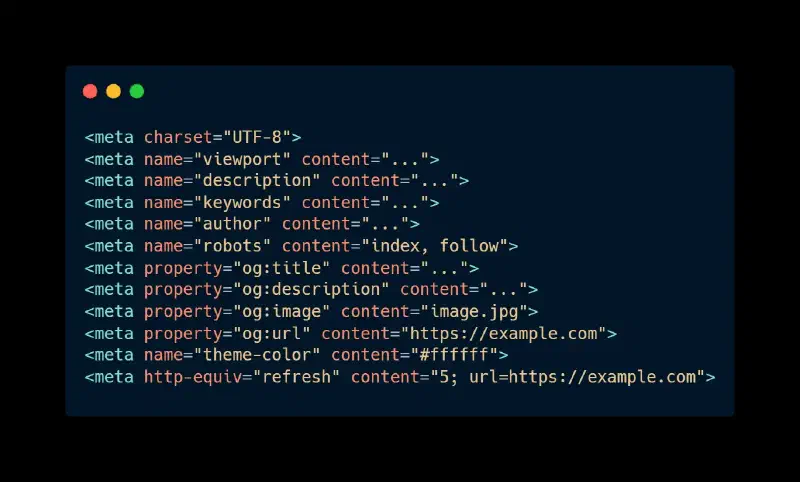
Meta tags may be invisible to the user, but they play a huge role in SEO, accessibility, and user experience. Let’s look at the essential ones.
1. <meta charset="UTF-8"> — Character Encoding#
Defines the character encoding for your page.
UTF-8 is the standard because it supports:
- English
- Arabic
- Emojis
- Special characters
Why it matters: Prevents broken characters or weird “�” symbols from appearing.
2. <meta name="viewport" content="width=device-width, initial-scale=1"> — Responsive Web Design#
This tag ensures your site adapts to different screen sizes.
Without it, your website will break on mobile.
Why it matters: Mobile-friendly websites rank better on Google.
3. <meta name="description" content="..."> — Search Snippet Description#
This creates the short description you see in Google search results.
Why it matters:
- Boosts click-through rate (CTR)
- Helps search engines understand your content
- Encourages users to visit your page
Tip: Keep it between 150–160 characters.
4. <meta name="keywords" content="..."> — Old-School Keyword Tag#
Years ago, search engines used this tag heavily. Today, Google ignores it completely — but it’s still useful for learning the history of SEO.
5. <meta name="author" content="..."> — Author Information#
Shows who wrote or owns the page.
Great for:
- Blogs
- Educational content
- Professional or branded pages
Why it matters: Builds trust and increases content credibility.
6. <meta name="robots" content="index, follow"> — Search Engine Instructions#
Controls whether search engines should:
- Index the page
- Follow the links
Common values:
index, follow→ Allow indexing (default)noindex, nofollow→ Keep page private
Power move: Use this for staging sites or pages you don’t want in search results.
7. Open Graph Tags — Social Media Optimization (OG Tags)#
These tags control how your page looks when shared on platforms like Facebook or Twitter.
<meta property="og:title" content="Page Title" />
<meta property="og:description" content="Short description" />
<meta property="og:image" content="image.jpg" />
<meta property="og:url" content="https://example.com" />
Why they matter:
- Improve click-through rates on social media
- Make your links look clean and professional
8. <meta name="theme-color" content="#ffffff"> — Branding the Browser UI#
Changes the browser’s theme color on mobile devices to match your brand.
Small touch, big impact — especially for apps and modern mobile-optimized sites.
9. <meta http-equiv="refresh" content="5; url=https://example.com"> — Automatic Redirect#
Redirects the user to another page after a set number of seconds.
Useful for:
- Login redirects
- Thank-you pages
- Download completion
Warning: Use sparingly — overusing redirects can hurt user experience.
Summary#
Meta tags are not optional — they are essential for creating web pages that are:
- Search-engine friendly
- Technically optimized
- User-friendly
- Structured and professional
They help search engines understand your content and present it correctly in search results and social media.
In the next lesson, we’ll explore Semantic HTML Elements — the tags that give structure, meaning, and accessibility to your content.